We have compiled a list of manufacturers, distributors, product information, reference prices, and rankings for Design support software.
ipros is IPROS GMS IPROS One of the largest technical database sites in Japan that collects information on.

Design support software(3d) - List of Manufacturers, Suppliers, Companies and Products | IPROS GMS

Last Updated: Aggregation Period:Feb 25, 2026~Mar 24, 2026
This ranking is based on the number of page views on our site.

Design support software Product List

1~13 item / All 13 items

Displayed results

Design support solution 'CATIA' Design/Styling (2)

3D sketching, subdivision surfaces, and more! We provide all solutions.

"3DEXPERIENCE CAITA" is an advanced design support solution enhanced on the 3DEXPERIENCE platform, built on CATIA V5. CATIA Design/Styling offers all solutions from 3D sketching, subdivision surfaces, Class A modeling to 3D printing, reverse engineering, and virtual reality. Additionally, CATIA's engineering and construction-related applications cater to industry-specific needs. *For more details, please refer to the PDF document or feel free to contact us.

  • 画像1.png
  • Process Control System
  • Other production management systems
  • Other operation management software
  • Design support software

Added to bookmarks

Bookmarks list

Bookmark has been removed

Bookmarks list

You can't add any more bookmarks

By registering as a member, you can increase the number of bookmarks you can save and organize them with labels.

Free membership registration

Awareness Support CAD System

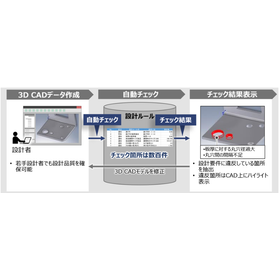
Achieve a reduction in design lead time through automatic checks of design rules!

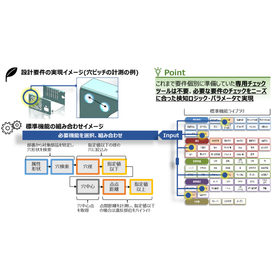
The "Awareness Support CAD System" is a system that analyzes design data and the designer's operation history to detect potential issues and inefficient processes in real-time during the design process. By utilizing past design data and best practices, it provides specific improvement suggestions to designers. It automatically checks 3D CAD models based on design requirements (design rules and ease of processing). Compared to visual checks, it significantly reduces the time required for checks and rework. 【Features】 ■ Real-time problem detection ■ Utilization of knowledge base ■ Analysis of operation history ■ Collaboration features ■ Customizability *For more details, please download the PDF or feel free to contact us.

  • 気づき支援2.png
  • Other CAD related software
  • Design support software

Added to bookmarks

Bookmarks list

Bookmark has been removed

Bookmarks list

You can't add any more bookmarks

By registering as a member, you can increase the number of bookmarks you can save and organize them with labels.

Free membership registration

Easy and convenient design tool "DesignFreeQ"

Design FreeQ, developed by pursuing Shark's intuitive drawing capabilities to the limit.

As a design tool that can be considered pre-CAD, it easily materializes diverse ideas and serves as a bridge to CAD/CAM products, creating the beauty of design itself. The "Design Navigator" function automatically displays drawing reference points (such as endpoints, midpoints, contact points, and center points) when the pointer approaches a shape. Furthermore, as the pointer moves, auxiliary lines and extensions of shapes are displayed one after another, eliminating the need to draw many auxiliary lines before drafting. Additionally, editing of drawings can be done freely with the "Shape Editing" function and the "Mask Function," which extracts only the necessary shapes. This is a successor to the drafting board. For more details, please contact us or refer to the catalog.

  • 3D CAD
  • Design support software

Added to bookmarks

Bookmarks list

Bookmark has been removed

Bookmarks list

You can't add any more bookmarks

By registering as a member, you can increase the number of bookmarks you can save and organize them with labels.

Free membership registration

Design support solution 'CATIA' Design/Styling (1)

Addressing industry-specific needs! The style and design of products are crucial factors for success in the market.

"3DEXPERIENCE CAITA" is an advanced design support solution enhanced on the 3DEXPERIENCE platform, built on CATIA V5. In industries from manufacturing to automotive and transportation machinery, the style and design of products are critical factors for achieving success in the market. The development of innovative shapes and materials, the realization of refined, high-quality, high-level surfaces, and the acquisition of appropriate decision-making tools using physical and virtual prototypes are key elements of "CATIA Design/Styling" that promote design innovation. [Key Elements of CATIA Design/Styling] ■ Development of innovative shapes and materials ■ Realization of refined, high-quality, high-level surfaces ■ Acquisition of appropriate decision-making tools using physical and virtual prototypes *For more details, please refer to the PDF document or feel free to contact us.

  • image_19.png
  • Process Control System
  • Other production management systems
  • Other operation management software
  • Design support software

Added to bookmarks

Bookmarks list

Bookmark has been removed

Bookmarks list

You can't add any more bookmarks

By registering as a member, you can increase the number of bookmarks you can save and organize them with labels.

Free membership registration

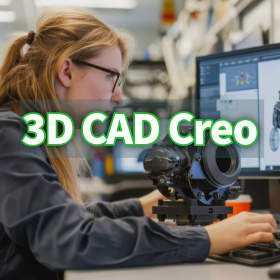
Instantly solve geometric tolerance questions! The era when 3D CAD tools become educators.

No need to worry if you don't have knowledge of specifications! We support practical GD&T education.

The Creo GD&T Advisor Extension is not just a tool for checking tolerances; it is also a powerful educational platform with rich help content built in. Even designers who are unfamiliar with GD&T standards can acquire knowledge while progressing with their work. If questions or errors arise regarding the application of GD&T during design, help can be accessed with a simple right-click on the messages displayed in the Advisor Tree. This help feature provides detailed information on the principles of GD&T, interpretations of the standards, and specific solutions to errors. As a result, designers can refer to the standards and acquire GD&T knowledge in a practical context without interrupting their work. This feature eliminates the hassle of flipping through standard documents and allows for immediate access to correct information, significantly contributing to the improvement of GD&T skill levels across the entire design team. Examples of tutorials are also included. For more details on the helpful features that aid in knowledge acquisition, please refer to the documentation. *For more information, please download the PDF or feel free to contact us.*

  • 3D CAD
  • Design support software

Added to bookmarks

Bookmarks list

Bookmark has been removed

Bookmarks list

You can't add any more bookmarks

By registering as a member, you can increase the number of bookmarks you can save and organize them with labels.

Free membership registration

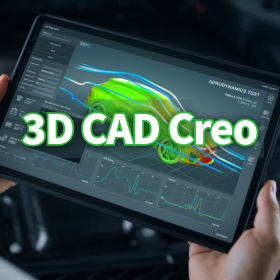
Real-time diagnosis of the design integrity of 3D CAD models.

Visualize the excess and deficiency of geometric tolerances with color! Aim for "Fully constrained."

One of the core features of the Creo GD&T Advisor Extension is the Advisor Tree and the Constraint State Legend. These are essential tools for designers to understand the integrity of the model in real-time during the process of applying GD&T. The Advisor Tree displays information, warnings, and error messages related to the applied GD&T in a hierarchical structure, pointing out design issues and violations of standards. Furthermore, the Constraint State Legend highlights the surfaces on the model with color coding to indicate whether they are "Fully constrained," "Partially constrained," or "Unconstrained" based on the tolerances. This allows for the visual identification of areas with insufficient or excessive tolerances, supporting complete and efficient tolerance design. Please check the details of the Advisor Tree, which prevents overlooking design intent, and the legend that indicates the state of tolerances with colors in the screen captures of the materials.

  • 3D CAD
  • Design support software

Added to bookmarks

Bookmarks list

Bookmark has been removed

Bookmarks list

You can't add any more bookmarks

By registering as a member, you can increase the number of bookmarks you can save and organize them with labels.

Free membership registration

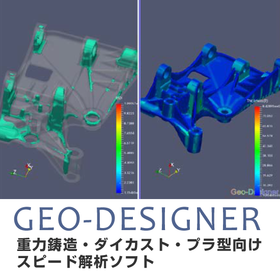
GEO-DESIGNER for Medical Devices

Reduce design and processing lead time with simple and speedy analysis.

In the medical device industry, the precision and safety of products are of utmost importance. Particularly in the manufacturing of medical device components with complex shapes, verifying manufacturability during the design phase is essential. Geo-Designer supports the rapid delivery of high-quality medical devices by early identification of issues in the design process and reducing rework in the manufacturing process. 【Usage Scenarios】 - Design of precision parts - Mold design - Optimization of manufacturing processes 【Benefits of Implementation】 - Reduction of design changes and rework - Stable supply of high-quality products - Cost reduction

  • simulator
  • Other analyses
  • Design support software

Added to bookmarks

Bookmarks list

Bookmark has been removed

Bookmarks list

You can't add any more bookmarks

By registering as a member, you can increase the number of bookmarks you can save and organize them with labels.

Free membership registration

Statistical design support software

Statistical design support software

In addition to conventional functions, we have incorporated user requests such as the addition of a visual display feature for response surfaces, and we have added the Taguchi method functionality to meet the demand for use not only in the design field but also in quality control. This allows for optimization across a wider range of fields. 1. Taguchi Method Functionality We have added a function to calculate the S/N ratio and sensitivity based on error factors, enabling optimization calculations that consider robustness. 2. Factor Effect Diagram Drawing Function Displays a factor effect diagram, allowing for a side-by-side comparison of the effects of factors on characteristics. This graph can also be used in the Taguchi method to confirm the effects of factors on the S/N ratio and sensitivity. 3. 3D Display Function for Response Surface Approximation Formula Displays the response surface approximation formula (estimation formula) for characteristics in a bird's-eye view, allowing for a visual examination of the impact of each factor on the characteristics. 4. Compatibility with Windows 2000 Compatible with Windows 2000 Professional (some limitations on printing functionality). [Features] - Adoption of a new response surface method. - Designed with the concept of being "easy to handle." - An optimization system with excellent cost performance. - Applicable in various fields such as machinery, chemistry, and medicine. - Capable of addressing nonlinear problems.

  • Other analyses
  • simulator
  • others
  • Design support software

Added to bookmarks

Bookmarks list

Bookmark has been removed

Bookmarks list

You can't add any more bookmarks

By registering as a member, you can increase the number of bookmarks you can save and organize them with labels.

Free membership registration

DesignFlowExtractor for Home Appliance Design

3D data to 2D drawings! Improve design efficiency.

In the field of home appliance design, the utilization of 3D data is essential due to the miniaturization and high functionality of products. However, in collaboration with manufacturing sites and partner companies, there are often cases where 2D drawings are necessary, and the task of converting from 3D to 2D can become a burden for designers. DesignFlowExtractor facilitates the process by performing shape verification and angle correction of three-dimensional data, making it easier to expand into two-dimensional data. As a result, designers can proceed with drawing creation more efficiently. 【Usage Scenarios】 - Design of home appliance enclosures - Creation of component drawings - Collaboration with manufacturing departments 【Benefits of Implementation】 - Reduction in design time - Decrease in drawing creation errors - Smooth information sharing

Added to bookmarks

Bookmarks list

Bookmark has been removed

Bookmarks list

You can't add any more bookmarks

By registering as a member, you can increase the number of bookmarks you can save and organize them with labels.

Free membership registration

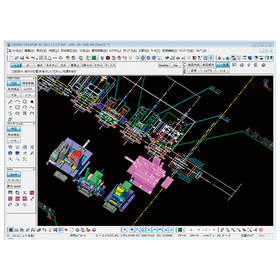
Aerospace CADPAC-CREATOR

Support for strength analysis in the aerospace field using 2D3D integrated design CAD.

In the aerospace industry, advanced strength analysis is essential to ensure the safety and reliability of products. In particular, the design of aircraft fuselages and components must withstand use in harsh environments. Inadequate design can lead to serious accidents. CADPAC-CREATOR integrates 2D and 3D data, making it easy to create and edit the shape data necessary for strength analysis. 【Usage Scenarios】 - Design of aircraft components - Structural design of spacecraft - Strength analysis simulation 【Benefits of Implementation】 - Reduced design time - Improved design quality - Cost reduction

  • cadpac-creator_02.png
  • 2D CAD machine
  • 3D CAD
  • Other CAD
  • Design support software

Added to bookmarks

Bookmarks list

Bookmark has been removed

Bookmarks list

You can't add any more bookmarks

By registering as a member, you can increase the number of bookmarks you can save and organize them with labels.

Free membership registration

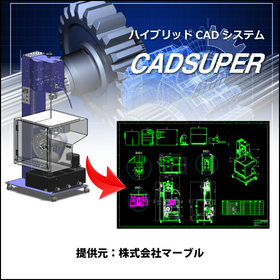
CADSUPER for Medical Devices

CADSUPER supporting the design of precision medical devices.

In the medical device industry, precise product design and accurate drawing creation are essential. The accuracy of drawings, which affects the safety and performance of medical devices, directly impacts product quality and patient safety. CADSUPER facilitates design changes with intuitive operations and supports accurate drawing creation. The barcode command option also streamlines drawing management. 【Usage Scenarios】 - Creation of design drawings for medical devices - Response to design changes - Streamlining of drawing management 【Benefits of Implementation】 - Reduction of prototyping time - Decrease in design errors - Reduction of drawing management costs

  • 2D CAD machine
  • Design support software

Added to bookmarks

Bookmarks list

Bookmark has been removed

Bookmarks list

You can't add any more bookmarks

By registering as a member, you can increase the number of bookmarks you can save and organize them with labels.

Free membership registration